Capacitor Failures

We continue to see motherboards with radial electrolytic capacitors in various stages of failure, starting with bulging and proceeding to cracking and leaking. Once they begin to bulge, they continue to expand until they crack and leak. This eventually leads to lockups, delays, restarts, error messages and eventually power-on failure. This is a slow failure process that proceeds over months.

Electroytic capacitors fail as the chemical gel inside begins to break down, producing gas bubbles that break the capacitor and allow the gel to leak out. Possible causes for the gel breakdown include a contaminated chemical gel formula, overheating and age. No conclusive determination as to the cause of capacitor failure has been proven.

Most of the capacitors that we see failing now are in Dell computers made between 2003-2005, but the problem is widespread with many other manufacturers having capacitor problems, including HP and Intel. There are extensive reports and even a lawsuit with Dell over the use of capacitors that began failing as soon as one year after usage.
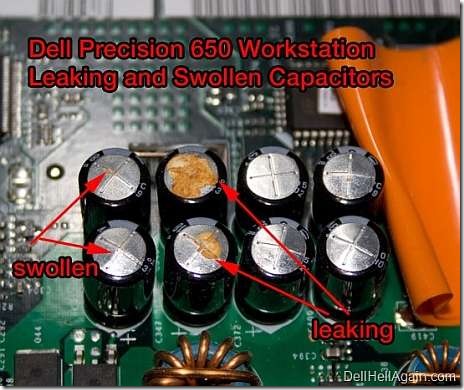
Bulged and failing capacitors

Failed capacitors

However, Dell has been reticent about capacitor failure and did not offer to replace or repair systems with failed capacitors. Intel also sold thousands of motherboards that developed capacitor failure, but they dismissed the problem describing the capacitors as unrelated to reliability or performance.

While failed capacitors can be diagnosed visually through inspection, it is not practical to test capacitors while attached to a motherboard, since the capacitor cannot be electrically isolated.

Our practice has been to visually inspect every motherboard and recommend replacement motherboards or systems when one capacitor is found to be bulging. We also offer a capacitor replacement service for high value desktop motherboards. For more information on this topic, visit BadCaps.net, a forum with extensive information on capacitor failure problems.


Posted in Computers | Tagged , , , , , , , , , | Leave a comment

Hard drives skyrocket in capacity

Just like memory chips and processor speeds, hard drive sizes continually increase. Typically, they double each year but they recently took a huge jump from 160gb to 500gb. The price difference between 80gb and 500gb drives dropped to $1, so our supplier has stopped stocking SATA drives below 500gb. IDE drives are still available in 160gb sizes, but we expect this to eventually end soon as 500gb or larger becomes the new minimum. At the same time, SSD drives are now widely available in a range of sizes starting at 40gb.

We expect that 2011 could be the last year for business desktop computers with hard drives, since 80gb for a desktop has proven adequate most users. We expect that by 2012 all new desktop computers will have 80gb SSD drives.

For home computers storing music, pictures and video, 1tb or larger drives will become common, and we expect 4tb drives that can store hours of high resolution video will be common on new desktops in 2012.

Posted in Computers, Hardware | Tagged | Leave a comment

Advice for home computer builders

We’ve seen a resurgence of calls from people buying computers parts over the Internet and building their own computers. While we applaud those users for their ingenuity, we have seen plenty of mistakes being made during the home assembly. While the speed and quality of parts have gone up, the opportunity to make mistakes when building a system hasn’t gone away.

The last time we saw a big surge in home built computers back in the 1990’s, nearly a whole generation of computers was rendered unreliable by one common mistake: fiber washers. We have removed these thin red paper washers from hundred of computers, installed by users that didn’t know that the were not meant to be used.

On the new high performance gaming systems, there are countless opportunities to make mistakes, including wrong connectors, missing brackets, missing screws and most importantly, reversed fans.

We recommend that anyone that buys their own parts and assembles their own computer, or buys a computer assembled from parts, should bring it in to us for review. We’ll check, configure and test the computer to ensure its built properly and runs perfectly.

Posted in Computers, Hardware | Tagged , | Leave a comment

Bad laptop video and the nVidia lawsuit settlement

For the past few years, we’ve been seeing many different laptops with video problems. The screens would be scrambled or black, but changing the LCD and inverter wouldn’t solve the problem. We diagnosed these laptops with failed motherboards, but because they were out of warranty the manufacturer would not repair them. When we looked for replacement parts, they were either prohibitively expensive or questionable because they might contain the same defective parts.

It turns out that all of the video problems were due to a problem with the graphics chip from nVidia, and a class action lawsuit was filed against nVidia for supplying defective chips to HP and Dell for their laptops. The lawsuit was settled in December 2010 with a $2 million settlement, but the claim period was surprisingly short; only 90 days for anyone to make their claim. The claim period ended March 14th, 2011.

For more information on the laptop models included and the failure symptoms, visit nVidia settlement.

Posted in Computers | Tagged , , | 2 Comments

New technology update on LED LCD monitors

Starting March 2011 we have new desktop LED LCD monitors available for the same price as CCFL LCD monitors. LED LCD monitors are the next generation of monitor technology and should eventually replace all CCFL (cold cathode fluorescent lamp) LCD technology. LED’s and CCFL’s are used to backlight the LCD panel, providing the brightness that makes a panel visible.

We’ve already seen the difference LED LCD’s make in laptops, since the LED LCD was introduced in 2010 on most 10″ netbook laptop panels. They are visibly thinner and brighter, and since they use less power the battery on the laptop runs longer.

LED LCD’s have many advantages over CCFL LCD’s: they use half the power of CCFL LCD’s, provide much longer lifespan and are much more reliable because they eliminate the most unreliable component in a CCFL LCD, the high voltage inverter circuit.

When the backlight bulb or inverter circuit fails, a faint image is visible but the screen goes dark. Backlight inverter circuit failure is the main cause of LCD failure, so eliminating the high voltage backlight inverter circuit in an LED LCD makes the entire monitor more reliable and longer lasting. While inverter circuits can be replaced by a manufacturer under warranty, it is nearly impossible to get replacement inverter circuits after the warranty ends. Manufacturers don’t provide the inverter circuits separately, and there are just a few models that have repair parts available.

Comparing two identical size 22″ LCD monitors, a CCFL unit uses 60 watts of electricty per hour while the LED model uses 30 watts. For every 10,000 hours of power-on time (equivalent to 5 years of weekday usage) this saves $45 in electricity. Considering an office with ten LED LCD monitors, they are saving $90 per year in electricity.

Another problem with CCFL LCD’s is that as they age and fail, they can appear pink for a few minutes until they warm up. CCFL LCD’s will also get dim after a few years usage. LED’s stay consistently bright and run cool.

Visit our LCD monitor page for the latest pricing and specifications on the LED LCD monitors we have for sale.

Posted in Computers, Hardware | Tagged , , | Leave a comment

New web site

On March 7, 2011 our old osCommerce site was removed and replaced with an entirely new web site created with software from WordPress.org.

Our last major web site change was in 2004, when we installed osCommerce software. While that site worked well and had over 100 pages of content, security problems with osCommerce and challenges with updating the site necessitated a change.

We chose WordPress because it is a simpler system that is optimized for static pages and frequent posts. Other content management systems try to offer too many features and complexity, but WordPress keeps it simple. For advanced features, WordPress has a extensive collection of plug-in programs that extend its capability, and the separate theme support allows us to change designs without re-creating the content.

Our new WordPress site joins over 19 million other WordPress web-sites, along with many well known sites that run with WordPress.

Posted in Computers | Tagged , , | Leave a comment